

微信扫一扫,移动浏览光盘
简介
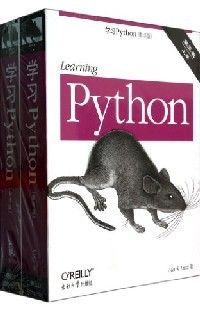
《学习Python(第5版)(影印版)(套装共2册)》通过小测验、练习和有效的讲解,这本易于遵循、自学的教程可以让你上手Python2.7和Python3.3——3.x和2.x产品线上的最新发布版本一一以及目前其他常见的版本。你也将学到一些最近在Python代码中越来越常见的高级语言特性。
目录
Preface
Part I. Getting Started
1. A Python Q&A Session
Why Do People Use Python?
Software Quality
Developer Productivity
Is Python a "Scripting Language"?
OK, but What's the Downside?
Who Uses Python Today?
What Can I Do with Python?
Systems Programming
GUIs
Internet Scripting
Component Integration
Database Programming
Rapid Prototyping
Numeric and Scientific Programming
And More: Gaming, Images, Data Mining, Robots, Excel
How Is Python Developed and Supported?
Open Source Tradeoffs
What Are Python's Technical Strengths?
It's Object-Oriented and Functional
It's Free
It's Portable
It's Powerful
It's Mixable
It's Relatively Easy to Use
It's Relatively Easy to Learn
It's Named After Monty Python
How Does Python Stack Up to Language X?
Chapter Summary
Test Your Knowledge: Quiz
Test Your Knowledge: Answers
2.How Python Runs Programs
Introducing the Python Interpreter
Program Execution
The Programmer's View
Python's View
Execution Model Variations
Python Implementation Alternatives
Execution Optimization Tools
Frozen Binaries
Future Possibilities?
Chapter Summary
Test Your Knowledge: Quiz
Test Your Knowledge: Answers
3.How You Run Programs
The Interactive Prompt
Starting an Interactive Session
The System Path
New Windows Options in 3.3: PATH, Launcher
Where to Run: Code Directories
What Not to Type: Prompts and Comments
Running Code Interactively
Why the Interactive Prompt?
Usage Notes: The Interactive Prompt
System Command Lines and Files
A First Script
Running Files with Command Lines
Command-Line Usage Variations
Usage Notes: Command Lines and Files
Unix-Style Executable Scripts: #!
Unix Script Basics
The Unix env Lookup Trick
The Python 3.3 Windows Launcher: #! Comes to Windows
Clicking File Icons
Icon-Click Basics
Clicking Icons on Windows
The input Trick on Windows
Other Icon-Click Limitations
Module Imports and Reloads
Import and Reload Basics
The Grander Module Story: Attributes
Usage Notes: import and reload
Using exec to Run Module Files
The IDLE User Interface
IDLE Startup Details
IDLE Basic Usage
IDLE Usability Features
Advanced IDLE Tools
Usage Notes: IDLE
Other IDEs
Other Launch Options
Embedding Calls
Frozen Binary Executables
Text Editor Launch Options
Still Other Launch Options
Future Possibilities?
Which Option Should I Use?
Chapter Summary
Test Your Knowledge: Quiz
Test Your Knowledge: Answers
Test Your Knowledge: Part I Exercises
Part II. Types and Operations
4. Introducing Python Object Types
The Python Conceptual Hierarchy
Why Use Built-in Types?
Python's Core Data Types
Numbers
Strings
Sequence Operations
Immutability
Type-Specific Methods
Getting Help
Other Ways to Code Strings
Unicode Strings
Pattern Matching
Lists
Sequence Operations
Type-Specific Operations
Bounds Checking
Nesting
Comprehensions
Dictionaries
Mapping Operations
Nesting Revisited
Missing Keys: if Tests
Sorting Keys: for Loops
Iteration and Optimization
Tuples
Why Tuples?
Files
Binary Bytes Files
Unicode Text Files
Other File-Like Tools
Other Core Types
How to Break Your Code's Flexibility
User-Defined Classes
And Everything Else
Chapter Summary
Test Your Knowledge: Quiz
Test Your Knowledge: Answers
5. Numeric Types
Numeric Type Basics
Numeric Literals
Built-in Numeric Tools
Python Expression Operators
Numbers in Action
Variables and Basic Expressions
Numeric Display Formats
Comparisons: Normal and Chained
Division: Classic, Floor, and True
Integer Precision
Complex Numbers
Hex, Octal, Binary: Literals and Conversions
Bitwise Operations
Other Built-in Numeric Tools
Other Numeric Types
Decimal Type
Fraction Type
Sets
Booleans
……
6. The Dynamic Typing Interlude
7. String Fundamentals
8. Lists and Dictionaries
9. Tuples, Files, and Everything Else
Part III. Statements and Syntax 10. Introducing Python Statements
11. Assignments, Expressions, and Prints
12. If Tests and Syntax Rules
13. while and for Loops
14. Iterations and Comprehensions
15. The Documentation Interlude
Part IV. Functions and Generators 16. Function Basics
17. Scopes
18. Arguments
19. Advanced Function Topics
20. Comprehensions and Generations
21. The Benchmarking Interlude
PartV. Modules and Packages 22. Modules: The Big Picture
23. Module Coding Basics
24. Module Packages
25. Advanced Module Topics
Part VI. Classes and OOP 26. OOP: The Big Picture
27. Class Coding Basics
28. A More Realistic Example
29. Class Coding Details
30. Operator Overloading
31. Designing with Classes
32. Advanced Class Topics
Part VII. Exceptions and Tools 33. Exception Basics
34. Exception Coding Details
35. Exception Objects
36. Designing with Exceptions
Part VIII. Advanced Topics 37. Unicode and Byte Strings
38. Managed Attributes
39. Decorators
40. Metaclasses
41. All Good Things
Part IX. Appendixes A. Installation and Configuration
B. The Python 3.3 Windows Launcher
C. Python Changes and This Book
D. Solutions to End-of-Part Exercises
Index
Part I. Getting Started
1. A Python Q&A Session
Why Do People Use Python?
Software Quality
Developer Productivity
Is Python a "Scripting Language"?
OK, but What's the Downside?
Who Uses Python Today?
What Can I Do with Python?
Systems Programming
GUIs
Internet Scripting
Component Integration
Database Programming
Rapid Prototyping
Numeric and Scientific Programming
And More: Gaming, Images, Data Mining, Robots, Excel
How Is Python Developed and Supported?
Open Source Tradeoffs
What Are Python's Technical Strengths?
It's Object-Oriented and Functional
It's Free
It's Portable
It's Powerful
It's Mixable
It's Relatively Easy to Use
It's Relatively Easy to Learn
It's Named After Monty Python
How Does Python Stack Up to Language X?
Chapter Summary
Test Your Knowledge: Quiz
Test Your Knowledge: Answers
2.How Python Runs Programs
Introducing the Python Interpreter
Program Execution
The Programmer's View
Python's View
Execution Model Variations
Python Implementation Alternatives
Execution Optimization Tools
Frozen Binaries
Future Possibilities?
Chapter Summary
Test Your Knowledge: Quiz
Test Your Knowledge: Answers
3.How You Run Programs
The Interactive Prompt
Starting an Interactive Session
The System Path
New Windows Options in 3.3: PATH, Launcher
Where to Run: Code Directories
What Not to Type: Prompts and Comments
Running Code Interactively
Why the Interactive Prompt?
Usage Notes: The Interactive Prompt
System Command Lines and Files
A First Script
Running Files with Command Lines
Command-Line Usage Variations
Usage Notes: Command Lines and Files
Unix-Style Executable Scripts: #!
Unix Script Basics
The Unix env Lookup Trick
The Python 3.3 Windows Launcher: #! Comes to Windows
Clicking File Icons
Icon-Click Basics
Clicking Icons on Windows
The input Trick on Windows
Other Icon-Click Limitations
Module Imports and Reloads
Import and Reload Basics
The Grander Module Story: Attributes
Usage Notes: import and reload
Using exec to Run Module Files
The IDLE User Interface
IDLE Startup Details
IDLE Basic Usage
IDLE Usability Features
Advanced IDLE Tools
Usage Notes: IDLE
Other IDEs
Other Launch Options
Embedding Calls
Frozen Binary Executables
Text Editor Launch Options
Still Other Launch Options
Future Possibilities?
Which Option Should I Use?
Chapter Summary
Test Your Knowledge: Quiz
Test Your Knowledge: Answers
Test Your Knowledge: Part I Exercises
Part II. Types and Operations
4. Introducing Python Object Types
The Python Conceptual Hierarchy
Why Use Built-in Types?
Python's Core Data Types
Numbers
Strings
Sequence Operations
Immutability
Type-Specific Methods
Getting Help
Other Ways to Code Strings
Unicode Strings
Pattern Matching
Lists
Sequence Operations
Type-Specific Operations
Bounds Checking
Nesting
Comprehensions
Dictionaries
Mapping Operations
Nesting Revisited
Missing Keys: if Tests
Sorting Keys: for Loops
Iteration and Optimization
Tuples
Why Tuples?
Files
Binary Bytes Files
Unicode Text Files
Other File-Like Tools
Other Core Types
How to Break Your Code's Flexibility
User-Defined Classes
And Everything Else
Chapter Summary
Test Your Knowledge: Quiz
Test Your Knowledge: Answers
5. Numeric Types
Numeric Type Basics
Numeric Literals
Built-in Numeric Tools
Python Expression Operators
Numbers in Action
Variables and Basic Expressions
Numeric Display Formats
Comparisons: Normal and Chained
Division: Classic, Floor, and True
Integer Precision
Complex Numbers
Hex, Octal, Binary: Literals and Conversions
Bitwise Operations
Other Built-in Numeric Tools
Other Numeric Types
Decimal Type
Fraction Type
Sets
Booleans
……
6. The Dynamic Typing Interlude
7. String Fundamentals
8. Lists and Dictionaries
9. Tuples, Files, and Everything Else
Part III. Statements and Syntax 10. Introducing Python Statements
11. Assignments, Expressions, and Prints
12. If Tests and Syntax Rules
13. while and for Loops
14. Iterations and Comprehensions
15. The Documentation Interlude
Part IV. Functions and Generators 16. Function Basics
17. Scopes
18. Arguments
19. Advanced Function Topics
20. Comprehensions and Generations
21. The Benchmarking Interlude
PartV. Modules and Packages 22. Modules: The Big Picture
23. Module Coding Basics
24. Module Packages
25. Advanced Module Topics
Part VI. Classes and OOP 26. OOP: The Big Picture
27. Class Coding Basics
28. A More Realistic Example
29. Class Coding Details
30. Operator Overloading
31. Designing with Classes
32. Advanced Class Topics
Part VII. Exceptions and Tools 33. Exception Basics
34. Exception Coding Details
35. Exception Objects
36. Designing with Exceptions
Part VIII. Advanced Topics 37. Unicode and Byte Strings
38. Managed Attributes
39. Decorators
40. Metaclasses
41. All Good Things
Part IX. Appendixes A. Installation and Configuration
B. The Python 3.3 Windows Launcher
C. Python Changes and This Book
D. Solutions to End-of-Part Exercises
Index
Learning python
- 名称
- 类型
- 大小
光盘服务联系方式: 020-38250260 客服QQ:4006604884
云图客服:
用户发送的提问,这种方式就需要有位在线客服来回答用户的问题,这种 就属于对话式的,问题是这种提问是否需要用户登录才能提问
Video Player
×
Audio Player
×
pdf Player
×
