

简介
Summary:
Publisher Summary 1
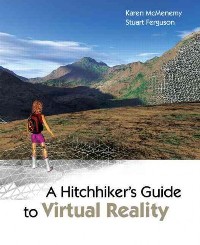
This book is a two-part guide to the science, technology, mathematics, and practical implementation of virtual reality. Part 1 contains an explanation of what virtual reality (VR) is (and what it is not!) and what lies inside the hardware components of a VR system. It also details the theory of many technically challenging aspects of VR in a very coherent manner. These include stereoscopy, computer vision, imagebased rendering, and inverse kinematics, all of which are central to creating an immersive and interactive VR system. Part 2 of the book concentrates on the actual implementation of a practical VR system. The accompanying CD is a complement to Part 2, providing over 30 projects and associated software that can be used to implement many aspects of a VR system.
Publisher Summary 2
This guide explains the theory, techniques, and technologies behind virtual reality and provides example programs. McMenemy (intelligent systems and control, Queen's U. Belfast, Ireland) and Ferguson (Queen's U. Belfast) bring together all the aspects of graphics, video, audio, and haptics that create virtual reality and describe its aims, to what it can be applied, what elements need to be brought together, how they work, and how theory works in practice. Key overlapping concepts from computer graphics and computer vision are also considered. The CD contains the programs for about 30 projects. For the first section, the authors assume that the reader has knowledge of the vector, coordinate geometry, and has studied science or engineering through the high school level. The second section focuses on programming and assumes familiarity with the C/C++ programming language and that readers have experience writing applications for Windows. The book is aimed at postgraduate students, programmers, research engineers, and scientists. Annotation 漏2007 Book News, Inc., Portland, OR (booknews.com)
目录
Contents
Preface 1
I What, Why and How 1
1 Introduction 3
1.1 What is virtual reality? . . . . . . . . . . . . . . . . . . . . . . . . . . . . . . . . 3
1.2 A quick tour of the book . . . . . . . . . . . . . . . . . . . . . . . . . . . . . . . . 4
1.3 Assumed knowledge and target audience . . . . . . . . . . . . . . . . . . . . . . . 5
1.4 Valuable resources for VR . . . . . . . . . . . . . . . . . . . . . . . . . . . . . . . 6
1.5 The code listings . . . . . . . . . . . . . . . . . . . . . . . . . . . . . . . . . . . . 7
2 The human senses and VR 11
2.1 Human visual system. . . . . . . . . . . . . . . . . . . . . . . . . . . . . . . . . . 11
2.1.1 The retina . . . . . . . . . . . . . . . . . . . . . . . . . . . . . . . . . . . . 12
2.1.2 Depth perception . . . . . . . . . . . . . . . . . . . . . . . . . . . . . . . 12
2.1.3 Virtual visual system . . . . . . . . . . . . . . . . . . . . . . . . . . . . . . 13
2.2 Human auditory system . . . . . . . . . . . . . . . . . . . . . . . . . . . . . . . . 14
2.2.1 Virtual auditory system . . . . . . . . . . . . . . . . . . . . . . . . . . . . 14
2.2.1.1 The basics . . . . . . . . . . . . . . . . . . . . . . . . . . . . . . 15
2.2.1.2 Binaural recordings and head related transfer functions . . . . . 16
2.3 Human tactile system . . . . . . . . . . . . . . . . . . . . . . . . . . . . . . . . . 16
2.3.1 Virtual tactile system . . . . . . . . . . . . . . . . . . . . . . . . . . . . . 17
2.4 Olfaction - the sense of smell . . . . . . . . . . . . . . . . . . . . . . . . . . . . . 18
2.5 Gustation - the sense of taste . . . . . . . . . . . . . . . . . . . . . . . . . . . . . 19
2.6 Summary . . . . . . . . . . . . . . . . . . . . . . . . . . . . . . . . . . . . . . . . 19
3 Applications and implications of VR 23
3.1 Entertainment . . . . . . . . . . . . . . . . . . . . . . . . . . . . . . . . . . . . . 24
I
II CONTENTS
3.2 Visualization . . . . . . . . . . . . . . . . . . . . . . . . . . . . . . . . . . . . . . 24
3.3 Training . . . . . . . . . . . . . . . . . . . . . . . . . . . . . . . . . . . . . . . . . 26
3.4 Education . . . . . . . . . . . . . . . . . . . . . . . . . . . . . . . . . . . . . . . . 27
3.5 Other applications . . . . . . . . . . . . . . . . . . . . . . . . . . . . . . . . . . . 28
3.6 Distributed VR . . . . . . . . . . . . . . . . . . . . . . . . . . . . . . . . . . . . . 29
3.7 The implications of VR . . . . . . . . . . . . . . . . . . . . . . . . . . . . . . . . 29
3.8 Summary . . . . . . . . . . . . . . . . . . . . . . . . . . . . . . . . . . . . . . . . 31
4 Building a practical VR system 35
4.1 Technology of visualization . . . . . . . . . . . . . . . . . . . . . . . . . . . . . . 36
4.1.1 Desktop VR . . . . . . . . . . . . . . . . . . . . . . . . . . . . . . . . . . . 36
4.1.1.1 Desktop CRT, LCD and plasma displays . . . . . . . . . . . . . 36
4.1.1.2 Desktop projection . . . . . . . . . . . . . . . . . . . . . . . . . . 39
4.1.2 Immersive VR . . . . . . . . . . . . . . . . . . . . . . . . . . . . . . . . . 40
4.1.2.1 Head mounted displays . . . . . . . . . . . . . . . . . . . . . . . 40
4.1.2.2 Computer Assisted Virtual Environments . . . . . . . . . . . . . 42
4.1.2.3 Immersive projection technology . . . . . . . . . . . . . . . . . . 43
4.1.2.4 Projection registration and blending . . . . . . . . . . . . . . . . 44
4.2 Technology for interaction . . . . . . . . . . . . . . . . . . . . . . . . . . . . . . . 49
4.2.1 Haptics . . . . . . . . . . . . . . . . . . . . . . . . . . . . . . . . . . . . . 49
4.2.2 Desktop interaction . . . . . . . . . . . . . . . . . . . . . . . . . . . . . . 51
4.2.3 Immersive interaction . . . . . . . . . . . . . . . . . . . . . . . . . . . . . 52
4.3 Technology for motion tracking and capture . . . . . . . . . . . . . . . . . . . . . 53
4.3.1 Inertial Tracking . . . . . . . . . . . . . . . . . . . . . . . . . . . . . . . . 54
4.3.2 Magnetic tracking . . . . . . . . . . . . . . . . . . . . . . . . . . . . . . . 57
4.3.3 Acoustic tracking . . . . . . . . . . . . . . . . . . . . . . . . . . . . . . . . 57
4.3.4 Optical tracking . . . . . . . . . . . . . . . . . . . . . . . . . . . . . . . . 59
4.3.5 Mechanical tracking . . . . . . . . . . . . . . . . . . . . . . . . . . . . . . 60
4.3.6 Location tracking . . . . . . . . . . . . . . . . . . . . . . . . . . . . . . . . 60
4.3.7 Hybrid tracking . . . . . . . . . . . . . . . . . . . . . . . . . . . . . . . . . 61
4.3.8 Commercial systems . . . . . . . . . . . . . . . . . . . . . . . . . . . . . . 62
4.4 Summary . . . . . . . . . . . . . . . . . . . . . . . . . . . . . . . . . . . . . . . . 62
5 Describing and storing the VR world 67
5.1 The geometric description of a 3D virtual world . . . . . . . . . . . . . . . . . . . 67
5.1.1 Color, materials and texture mapping . . . . . . . . . . . . . . . . . . . . 69
CONTENTS III
5.1.2 Hierarchical data structures . . . . . . . . . . . . . . . . . . . . . . . . . 69
5.1.3 The natural world . . . . . . . . . . . . . . . . . . . . . . . . . . . . . . . 71
5.2 SceneGraphs . . . . . . . . . . . . . . . . . . . . . . . . . . . . . . . . . . . . . . 71
5.2.1 OpenInventor . . . . . . . . . . . . . . . . . . . . . . . . . . . . . . . . . . 73
5.2.2 OpenSceneGraph . . . . . . . . . . . . . . . . . . . . . . . . . . . . . . . . 74
5.3 Putting VR content on the WEB . . . . . . . . . . . . . . . . . . . . . . . . . . . 76
5.3.1 X3D/VRML/XML . . . . . . . . . . . . . . . . . . . . . . . . . . . . . . 78
5.4 Storing images and textures . . . . . . . . . . . . . . . . . . . . . . . . . . . . . . 80
5.4.1 JPEG storage format . . . . . . . . . . . . . . . . . . . . . . . . . . . . . 81
5.4.2 Lossless image storage formats . . . . . . . . . . . . . . . . . . . . . . . . 82
5.5 Storing video . . . . . . . . . . . . . . . . . . . . . . . . . . . . . . . . . . . . . . 83
5.5.1 AVI . . . . . . . . . . . . . . . . . . . . . . . . . . . . . . . . . . . . . . . 83
5.5.2 Codecs . . . . . . . . . . . . . . . . . . . . . . . . . . . . . . . . . . . . . 84
5.5.3 Video data compression . . . . . . . . . . . . . . . . . . . . . . . . . . . . 84
5.5.4 A final comment on filename extensions . . . . . . . . . . . . . . . . . . . 86
5.6 Summary . . . . . . . . . . . . . . . . . . . . . . . . . . . . . . . . . . . . . . . . 86
6 A pocketbook 3D theory reference 89
6.1 Coordinate Systems . . . . . . . . . . . . . . . . . . . . . . . . . . . . . . . . . . 89
6.1.1 Cartesian . . . . . . . . . . . . . . . . . . . . . . . . . . . . . . . . . . . . 90
6.1.2 Spherical Polar . . . . . . . . . . . . . . . . . . . . . . . . . . . . . . . . . 90
6.2 Vectors . . . . . . . . . . . . . . . . . . . . . . . . . . . . . . . . . . . . . . . . . 91
6.3 The line . . . . . . . . . . . . . . . . . . . . . . . . . . . . . . . . . . . . . . . . . 92
6.4 The plane . . . . . . . . . . . . . . . . . . . . . . . . . . . . . . . . . . . . . . . . 93
6.4.1 Intersection of a line and a plane . . . . . . . . . . . . . . . . . . . . . . . 94
6.4.2 Intersection of a line segment and a plane . . . . . . . . . . . . . . . . . . 94
6.4.3 Intersection of a line with a triangular polygon . . . . . . . . . . . . . . . 95
6.5 Reflection in a plane . . . . . . . . . . . . . . . . . . . . . . . . . . . . . . . . . . 96
6.6 Transformations . . . . . . . . . . . . . . . . . . . . . . . . . . . . . . . . . . . . 97
6.6.1 Translation . . . . . . . . . . . . . . . . . . . . . . . . . . . . . . . . . . . 99
6.6.2 Scaling . . . . . . . . . . . . . . . . . . . . . . . . . . . . . . . . . . . . . 99
6.6.3 Rotation . . . . . . . . . . . . . . . . . . . . . . . . . . . . . . . . . . . . 100
6.6.3.1 Rotate about the z axis . . . . . . . . . . . . . . . . . . . . . . . 100
6.6.3.2 Rotation about the y axis . . . . . . . . . . . . . . . . . . . . . . 101
6.6.3.3 Rotation about the x axis . . . . . . . . . . . . . . . . . . . . . . 102
IV CONTENTS
6.6.4 Combining transformations . . . . . . . . . . . . . . . . . . . . . . . . . . 102
6.6.5 Rotation about an arbitrary axis . . . . . . . . . . . . . . . . . . . . . . . 102
6.6.6 Viewing transformation . . . . . . . . . . . . . . . . . . . . . . . . . . . . 103
6.6.7 Projection transformation . . . . . . . . . . . . . . . . . . . . . . . . . . 106
6.7 Summary . . . . . . . . . . . . . . . . . . . . . . . . . . . . . . . . . . . . . . . . 107
7 The rendering pipeline 111
7.1 Geometry and vertex operations . . . . . . . . . . . . . . . . . . . . . . . . . . . 112
7.2 Culling and clipping . . . . . . . . . . . . . . . . . . . . . . . . . . . . . . . . . . 113
7.2.1 Culling . . . . . . . . . . . . . . . . . . . . . . . . . . . . . . . . . . . . . 113
7.2.2 Clipping . . . . . . . . . . . . . . . . . . . . . . . . . . . . . . . . . . . . . 115
7.2.2.1 Clipping a triangular polygon with a clipping plane . . . . . . . 115
7.3 Screen mapping . . . . . . . . . . . . . . . . . . . . . . . . . . . . . . . . . . . . . 117
7.4 Scan conversion or rasterization . . . . . . . . . . . . . . . . . . . . . . . . . . . . 117
7.4.1 The Z-buffer algorithm . . . . . . . . . . . . . . . . . . . . . . . . . . . . . 118
7.5 Fragment processing . . . . . . . . . . . . . . . . . . . . . . . . . . . . . . . . . . 119
7.5.1 Shading (lighting) . . . . . . . . . . . . . . . . . . . . . . . . . . . . . . . 119
7.5.2 Gouraud and Phong shading . . . . . . . . . . . . . . . . . . . . . . . . . 124
7.5.2.1 Gouraud shading . . . . . . . . . . . . . . . . . . . . . . . . . . . 125
7.5.2.2 Phong shading . . . . . . . . . . . . . . . . . . . . . . . . . . . . 126
7.6 Texturing . . . . . . . . . . . . . . . . . . . . . . . . . . . . . . . . . . . . . . . . 128
7.6.1 Procedural textures . . . . . . . . . . . . . . . . . . . . . . . . . . . . . . 128
7.6.2 Image mapping . . . . . . . . . . . . . . . . . . . . . . . . . . . . . . . . . 129
7.6.3 Transparency mapping . . . . . . . . . . . . . . . . . . . . . . . . . . . . . 130
7.6.4 Bump mapping . . . . . . . . . . . . . . . . . . . . . . . . . . . . . . . . . 130
7.6.5 Reflection mapping . . . . . . . . . . . . . . . . . . . . . . . . . . . . . . . 131
7.6.6 GPU programmable shaders . . . . . . . . . . . . . . . . . . . . . . . . . . 132
7.7 Summary . . . . . . . . . . . . . . . . . . . . . . . . . . . . . . . . . . . . . . . . 133
8 Computer Vision in VR 137
8.1 The mathematical language of geometric computer vision . . . . . . . . . . . . . 138
8.2 Cameras . . . . . . . . . . . . . . . . . . . . . . . . . . . . . . . . . . . . . . . . . 139
8.2.1 Camera projections . . . . . . . . . . . . . . . . . . . . . . . . . . . . . . . 139
8.2.2 Camera models . . . . . . . . . . . . . . . . . . . . . . . . . . . . . . . . . 140
8.3 A brief look at some advanced ideas in computer vision . . . . . . . . . . . . . . 142
8.3.1 Removing camera distortions . . . . . . . . . . . . . . . . . . . . . . . . . 142
CONTENTS V
8.3.2 Removing perspective distortion . . . . . . . . . . . . . . . . . . . . . . . 145
8.3.3 Recovering the camera matrix . . . . . . . . . . . . . . . . . . . . . . . . 147
8.3.4 Estimation . . . . . . . . . . . . . . . . . . . . . . . . . . . . . . . . . . . 149
8.3.5 Reconstructing scenes from images . . . . . . . . . . . . . . . . . . . . . 152
8.3.6 Epipolar geometry and the fundamental matrix . . . . . . . . . . . . . . 154
8.3.7 Extracting 3D information from multiple views . . . . . . . . . . . . . . . 158
8.3.8 Extracting 3D information from image sequences . . . . . . . . . . . . . 159
8.4 Software libraries for Computer Vision . . . . . . . . . . . . . . . . . . . . . . . 160
8.5 Summary . . . . . . . . . . . . . . . . . . . . . . . . . . . . . . . . . . . . . . . . 161
9 Image based rendering 165
9.1 General approaches to IBR . . . . . . . . . . . . . . . . . . . . . . . . . . . . . . 165
9.2 Acquiring images for IBR . . . . . . . . . . . . . . . . . . . . . . . . . . . . . . . 167
9.3 Mosaicing and making panoramic images . . . . . . . . . . . . . . . . . . . . . . 168
9.3.1 QuickTime VR . . . . . . . . . . . . . . . . . . . . . . . . . . . . . . . . . 171
9.4 Summary . . . . . . . . . . . . . . . . . . . . . . . . . . . . . . . . . . . . . . . . 172
10 Stereopsis 175
10.1 Parallax . . . . . . . . . . . . . . . . . . . . . . . . . . . . . . . . . . . . . . . . . 177
10.1.1 A stereo camera model . . . . . . . . . . . . . . . . . . . . . . . . . . . . . 179
10.2 Head mounted displays . . . . . . . . . . . . . . . . . . . . . . . . . . . . . . . . . 183
10.3 Active, passive and other stereoscopic systems . . . . . . . . . . . . . . . . . . . . 184
10.3.1 Anaglyph stereo red/green or red/blue . . . . . . . . . . . . . . . . . . . . 184
10.3.2 Active stereo . . . . . . . . . . . . . . . . . . . . . . . . . . . . . . . . . . 185
10.3.3 Passive stereo . . . . . . . . . . . . . . . . . . . . . . . . . . . . . . . . . . 186
10.3.4 Autostereopsis . . . . . . . . . . . . . . . . . . . . . . . . . . . . . . . . . 187
10.3.5 Crosstalk and ghosting . . . . . . . . . . . . . . . . . . . . . . . . . . . . . 188
10.3.6 Stereopsis for multiple users . . . . . . . . . . . . . . . . . . . . . . . . . . 188
10.3.7 Front or back projection . . . . . . . . . . . . . . . . . . . . . . . . . . . . 189
10.4 Summary . . . . . . . . . . . . . . . . . . . . . . . . . . . . . . . . . . . . . . . . 189
11 Navigation and movement in VR 193
11.1 Computer animation . . . . . . . . . . . . . . . . . . . . . . . . . . . . . . . . . . 193
11.2 Moving and rotating in 3D . . . . . . . . . . . . . . . . . . . . . . . . . . . . . . 195
11.2.1 Moving smoothly . . . . . . . . . . . . . . . . . . . . . . . . . . . . . . . . 195
11.2.2 Rotating smoothly . . . . . . . . . . . . . . . . . . . . . . . . . . . . . . . 198
VI CONTENTS
11.3 Robotic motion . . . . . . . . . . . . . . . . . . . . . . . . . . . . . . . . . . . . . 199
11.3.1 Specifying robotic positions . . . . . . . . . . . . . . . . . . . . . . . . . . 200
11.4 Inverse kinematics . . . . . . . . . . . . . . . . . . . . . . . . . . . . . . . . . . . 202
11.4.1 The IK problem . . . . . . . . . . . . . . . . . . . . . . . . . . . . . . . . 203
11.4.2 Solving the IK problem in two dimensions . . . . . . . . . . . . . . . . . 204
11.4.2.1 Iterating towards the goal . . . . . . . . . . . . . . . . . . . . . . 206
11.4.2.2 Equations for a general two-dimensional articulated linkage . . . 206
11.4.3 Solving the IK problem in three-dimensions . . . . . . . . . . . . . . . . 206
11.4.3.1 A simple IK algorithm for use in real-time . . . . . . . . . . . . 208
11.5 Summary . . . . . . . . . . . . . . . . . . . . . . . . . . . . . . . . . . . . . . . . 209
Concluding part I 213
II Practical programs for VR 215
12 Tools, libraries and templates for the VR programs 217
12.1 The hardware environment . . . . . . . . . . . . . . . . . . . . . . . . . . . . . . 218
12.1.1 Graphics adapters . . . . . . . . . . . . . . . . . . . . . . . . . . . . . . . 218
12.1.2 GPUs . . . . . . . . . . . . . . . . . . . . . . . . . . . . . . . . . . . . . . 218
12.1.3 Human Interface Devices (HIDs) . . . . . . . . . . . . . . . . . . . . . . . 219
12.2 Software tools . . . . . . . . . . . . . . . . . . . . . . . . . . . . . . . . . . . . . . 219
12.2.1 Why C and C++ . . . . . . . . . . . . . . . . . . . . . . . . . . . . . . . . 219
12.2.2 Compilers . . . . . . . . . . . . . . . . . . . . . . . . . . . . . . . . . . . . 220
12.3 A framework for the applications . . . . . . . . . . . . . . . . . . . . . . . . . . . 220
12.4 The Component Object Model . . . . . . . . . . . . . . . . . . . . . . . . . . . . 221
12.4.1 What is COM . . . . . . . . . . . . . . . . . . . . . . . . . . . . . . . . . 221
12.4.2 How COM works . . . . . . . . . . . . . . . . . . . . . . . . . . . . . . . 222
12.5 Summary . . . . . . . . . . . . . . . . . . . . . . . . . . . . . . . . . . . . . . . . 224
13 Programming 3D graphics in real-time 229
13.1 Visualizing a virtual world using OpenGL . . . . . . . . . . . . . . . . . . . . . . 229
13.1.1 The architecture of OpenGL . . . . . . . . . . . . . . . . . . . . . . . . . 230
13.1.2 Rendering OpenGL in a Windows window . . . . . . . . . . . . . . . . . . 234
13.1.3 Designing the software . . . . . . . . . . . . . . . . . . . . . . . . . . . . . 235
13.1.4 Setting up . . . . . . . . . . . . . . . . . . . . . . . . . . . . . . . . . . . . 237
13.1.5 Loading the model . . . . . . . . . . . . . . . . . . . . . . . . . . . . . . . 242
CONTENTS VII
13.1.6 Rendering the 3D data . . . . . . . . . . . . . . . . . . . . . . . . . . . . . 242
13.1.7 Image mapping . . . . . . . . . . . . . . . . . . . . . . . . . . . . . . . . . 246
13.2 System independence with the GLUT libraries . . . . . . . . . . . . . . . . . . . 248
13.3 Visualizing a virtual world using Direct3D . . . . . . . . . . . . . . . . . . . . . . 252
13.3.1 A bit of history . . . . . . . . . . . . . . . . . . . . . . . . . . . . . . . . . 252
13.3.2 The architecture of Direct3D . . . . . . . . . . . . . . . . . . . . . . . . . 252
13.3.3 Comparing OpenGL(OGL) and Direct3D(D3D) . . . . . . . . . . . . . . . 254
13.3.4 Rendering with Direct3D into a Windows window . . . . . . . . . . . . . 255
13.3.5 Preparing the data for use by Direct3D . . . . . . . . . . . . . . . . . . . 257
13.3.6 Setting up the view transformations . . . . . . . . . . . . . . . . . . . . . 259
13.3.7 Lighting . . . . . . . . . . . . . . . . . . . . . . . . . . . . . . . . . . . . . 260
13.3.8 Executing the application . . . . . . . . . . . . . . . . . . . . . . . . . . . 260
13.4 Summary . . . . . . . . . . . . . . . . . . . . . . . . . . . . . . . . . . . . . . . . 261
14 High quality 3D with OpenGL 2 265
14.1 OpenGL version 2 . . . . . . . . . . . . . . . . . . . . . . . . . . . . . . . . . . . 266
14.1.1 How it works . . . . . . . . . . . . . . . . . . . . . . . . . . . . . . . . . . 267
14.1.2 Compiling, installing and using OpenGL shaders . . . . . . . . . . . . . . 268
14.1.3 The data type qualifiers and samplers . . . . . . . . . . . . . . . . . . . . 269
14.1.4 The built-in variables . . . . . . . . . . . . . . . . . . . . . . . . . . . . . 270
14.1.5 Upgrading to version 2 . . . . . . . . . . . . . . . . . . . . . . . . . . . . . 270
14.1.6 Using OpenGL 2 in a Windows program . . . . . . . . . . . . . . . . . . . 271
14.2 Using programmable shaders . . . . . . . . . . . . . . . . . . . . . . . . . . . . . 272
14.2.1 Modifying the program . . . . . . . . . . . . . . . . . . . . . . . . . . . . 273
14.3 Some basic shader codes . . . . . . . . . . . . . . . . . . . . . . . . . . . . . . . . 276
14.3.1 Emulating the fixed functionality . . . . . . . . . . . . . . . . . . . . . . . 276
14.3.2 Lighting and shading . . . . . . . . . . . . . . . . . . . . . . . . . . . . . . 276
14.3.3 Image mapping . . . . . . . . . . . . . . . . . . . . . . . . . . . . . . . . . 276
14.3.4 Reflection mapping . . . . . . . . . . . . . . . . . . . . . . . . . . . . . . . 279
14.3.5 Bump mapping . . . . . . . . . . . . . . . . . . . . . . . . . . . . . . . . . 279
14.3.6 Procedural textures . . . . . . . . . . . . . . . . . . . . . . . . . . . . . . 283
14.4 Programmable shaders in Direct3D . . . . . . . . . . . . . . . . . . . . . . . . . . 283
14.5 Summary . . . . . . . . . . . . . . . . . . . . . . . . . . . . . . . . . . . . . . . . 283
15 Using multimedia in VR 289
15.1 A brief overview of DirectShow . . . . . . . . . . . . . . . . . . . . . . . . . . . . 290
VIII CONTENTS
15.1.1 Threading . . . . . . . . . . . . . . . . . . . . . . . . . . . . . . . . . . . . 293
15.2 Methodology . . . . . . . . . . . . . . . . . . . . . . . . . . . . . . . . . . . . . . 293
15.3 A movie player . . . . . . . . . . . . . . . . . . . . . . . . . . . . . . . . . . . . . 294
15.3.1 A final touch: drag and drop . . . . . . . . . . . . . . . . . . . . . . . . . 298
15.4 Video sources . . . . . . . . . . . . . . . . . . . . . . . . . . . . . . . . . . . . . . 298
15.4.1 Viewing video from a DV or USB camera . . . . . . . . . . . . . . . . . . 303
15.4.2 Capturing video . . . . . . . . . . . . . . . . . . . . . . . . . . . . . . . . 304
15.5 Custom filters and utility programs . . . . . . . . . . . . . . . . . . . . . . . . . . 306
15.5.1 Using video filters . . . . . . . . . . . . . . . . . . . . . . . . . . . . . . . 306
15.5.2 Image processing with an in-place filter . . . . . . . . . . . . . . . . . . . 307
15.5.3 Making movies from images . . . . . . . . . . . . . . . . . . . . . . . . . . 308
15.5.4 Saving frames from a video stream . . . . . . . . . . . . . . . . . . . . . . 308
15.6 Playing movies or live video into textures . . . . . . . . . . . . . . . . . . . . . . 310
15.6.1 The renderer filters . . . . . . . . . . . . . . . . . . . . . . . . . . . . . . . 312
15.6.1.1 The application . . . . . . . . . . . . . . . . . . . . . . . . . . . 317
15.6.2 Rendering using Direct3D . . . . . . . . . . . . . . . . . . . . . . . . . . . 317
15.6.3 Rendering using OpenGL . . . . . . . . . . . . . . . . . . . . . . . . . . . 319
15.6.4 Using two FilterGraphs . . . . . . . . . . . . . . . . . . . . . . . . . . . . 320
15.6.5 Rendering two outputs from one filter . . . . . . . . . . . . . . . . . . . . 320
15.7 Summary . . . . . . . . . . . . . . . . . . . . . . . . . . . . . . . . . . . . . . . . 322
16 Programming stereopsis 325
16.1 Display adapter hardware for stereopsis . . . . . . . . . . . . . . . . . . . . . . . 326
16.1.1 Stereo ready adapters . . . . . . . . . . . . . . . . . . . . . . . . . . . . . 326
16.1.2 Non-stereo-ready adapters . . . . . . . . . . . . . . . . . . . . . . . . . . . 327
16.2 File formats for storing stereoscopic images . . . . . . . . . . . . . . . . . . . . . 328
16.3 A file format for stereo movies . . . . . . . . . . . . . . . . . . . . . . . . . . . . 330
16.4 Displaying stereoscopic images . . . . . . . . . . . . . . . . . . . . . . . . . . . . 330
16.5 A stereoscopic movie player . . . . . . . . . . . . . . . . . . . . . . . . . . . . . . 333
16.5.1 The renderer filter . . . . . . . . . . . . . . . . . . . . . . . . . . . . . . . 336
16.5.2 Putting the application together . . . . . . . . . . . . . . . . . . . . . . . 338
16.5.3 The movie player function and application FilterGraph . . . . . . . . . . 340
16.5.4 Control . . . . . . . . . . . . . . . . . . . . . . . . . . . . . . . . . . . . . 341
16.6 Capturing stereo pictures from a pair of video cameras . . . . . . . . . . . . . . . 341
16.6.1 Building the FilterGraph to capture images . . . . . . . . . . . . . . . . . 347
CONTENTS IX
16.7 Making a stereo movie from image sequences . . . . . . . . . . . . . . . . . . . . 347
16.7.1 The source filter . . . . . . . . . . . . . . . . . . . . . . . . . . . . . . . . 348
16.8 Summary . . . . . . . . . . . . . . . . . . . . . . . . . . . . . . . . . . . . . . . . 353
17 Programming input and force feedback 357
17.1 DirectInput . . . . . . . . . . . . . . . . . . . . . . . . . . . . . . . . . . . . . . . 358
17.1.1 Configuring DirectInput and finding devices . . . . . . . . . . . . . . . . . 359
17.1.2 Acquiring data . . . . . . . . . . . . . . . . . . . . . . . . . . . . . . . . . 361
17.2 Force feedback with DirectInput . . . . . . . . . . . . . . . . . . . . . . . . . . . 361
17.3 Haptic software libraries and tools . . . . . . . . . . . . . . . . . . . . . . . . . . 365
17.3.1 OpenHaptics . . . . . . . . . . . . . . . . . . . . . . . . . . . . . . . . . . 366
17.4 Middleware . . . . . . . . . . . . . . . . . . . . . . . . . . . . . . . . . . . . . . . 368
17.4.1 VRPN . . . . . . . . . . . . . . . . . . . . . . . . . . . . . . . . . . . . . . 369
17.4.2 OpenTracker . . . . . . . . . . . . . . . . . . . . . . . . . . . . . . . . . . 369
17.5 Interfacing custom VR hardware with the applications . . . . . . . . . . . . . . 370
17.5.1 A brief look at the USB . . . . . . . . . . . . . . . . . . . . . . . . . . . . 370
17.5.2 USB interfacing . . . . . . . . . . . . . . . . . . . . . . . . . . . . . . . . . 371
17.5.3 Accessing the USB HID directly from C/C++ . . . . . . . . . . . . . . . 374
17.6 Summary . . . . . . . . . . . . . . . . . . . . . . . . . . . . . . . . . . . . . . . . 375
18 Building on the basics, some projects in VR 379
18.1 Video editing . . . . . . . . . . . . . . . . . . . . . . . . . . . . . . . . . . . . . . 379
18.1.1 DirectShow Editing Services . . . . . . . . . . . . . . . . . . . . . . . . . . 379
18.1.2 Recompression . . . . . . . . . . . . . . . . . . . . . . . . . . . . . . . . . 381
18.2 Stereo movie and picture output for a head mounted display . . . . . . . . . . . . 381
18.3 Video processing . . . . . . . . . . . . . . . . . . . . . . . . . . . . . . . . . . . . 381
18.4 Chroma-keying . . . . . . . . . . . . . . . . . . . . . . . . . . . . . . . . . . . . . 382
18.5 A multi-projector VR theater system . . . . . . . . . . . . . . . . . . . . . . . . . 383
18.5.1 Hardware and software design . . . . . . . . . . . . . . . . . . . . . . . . . 384
18.5.2 Distortion and blending . . . . . . . . . . . . . . . . . . . . . . . . . . . . 385
18.5.3 Synchronization . . . . . . . . . . . . . . . . . . . . . . . . . . . . . . . . 386
18.6 Using image processing and computer vision libraries . . . . . . . . . . . . . . . . 387
18.7 Augmented reality (AR) . . . . . . . . . . . . . . . . . . . . . . . . . . . . . . . . 388
18.7.1 The Augmented Reality Toolkit . . . . . . . . . . . . . . . . . . . . . . . . 388
18.7.2 How does the ARtoolkit work . . . . . . . . . . . . . . . . . . . . . . . . . 391
18.8 Virtual sculpting in 3D . . . . . . . . . . . . . . . . . . . . . . . . . . . . . . . . . 391
X CONTENTS
18.8.1 The idea . . . . . . . . . . . . . . . . . . . . . . . . . . . . . . . . . . . . . 392
18.8.2 The mathematical model . . . . . . . . . . . . . . . . . . . . . . . . . . . 394
18.8.3 Implementation . . . . . . . . . . . . . . . . . . . . . . . . . . . . . . . . . 396
The end 396
A Rotation with Quaternions 401
A.1 The quaternion . . . . . . . . . . . . . . . . . . . . . . . . . . . . . . . . . . . . . 401
A.2 Quaternions and rotations . . . . . . . . . . . . . . . . . . . . . . . . . . . . . . 402
A.2.1 Converting Euler angles to quaternion . . . . . . . . . . . . . . . . . . . . 403
A.2.2 Converting a quaternion to a matrix . . . . . . . . . . . . . . . . . . . . . 404
A.3 Converting a matrix to a quaternion . . . . . . . . . . . . . . . . . . . . . . . . . 404
A.4 Converting a quaternion to Euler angles . . . . . . . . . . . . . . . . . . . . . . . 406
A.5 Interpolating quaternions . . . . . . . . . . . . . . . . . . . . . . . . . . . . . . . 406
B The generalized inverse 411
C Aligning two images in a panoramic mosaic 415
D A minimal Windows template program 423
E An MFC template program 429
F The COM in practice 441
F.1 Using COM . . . . . . . . . . . . . . . . . . . . . . . . . . . . . . . . . . . . . . . 441
F.2 COMrecipes . . . . . . . . . . . . . . . . . . . . . . . . . . . . . . . . . . . . . . 442
Index 445
- 名称
- 类型
- 大小
光盘服务联系方式: 020-38250260 客服QQ:4006604884
云图客服:
用户发送的提问,这种方式就需要有位在线客服来回答用户的问题,这种 就属于对话式的,问题是这种提问是否需要用户登录才能提问
Video Player
×
Audio Player
×
pdf Player
×
亲爱的云图用户,
光盘内的文件都可以直接点击浏览哦
无需下载,在线查阅资料!
