

微信扫一扫,移动浏览光盘
简介
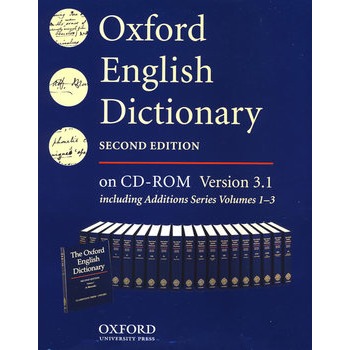
The Oxford English Dictionary is the internationally recognized authority on the evolution of the English language from 1150 to the present day. The Dictionary defines over 500,000 words and traces their usage through 2.5 million illustrative quotations from a wide range of literary and other sources. It is an unsurpassed guide to the meaning, pronunciation, and history of the English language. This new version of the Oxford English Dictionary (Second Edition) on CD-ROM offers unparalleled access to the world's most important reference work for the English language. The text of this version now includes almost 2,000 words and phrases from the OED team's ongoing revision program, as well as the full text of the OED Second Edition, published in 1989, the Oxford English Dictionary Addition Series (Volumes 1-3), published in 1993 and 1997, the Bibliography to the Second Edition, and other ancillary material. Minimum system requirements: PC with 200 MHz Pentium-class processor 32 MB RAM (64 MB recommended) 16-speed CD-ROM drive (32-speed recommended) Windows 95, 98, 98 Se, Me, NT, 2000, XP, or Vista Minimum 1.1 GB hard disk space to run the OED from the CD-ROM and 1.7 GB to install the CD-ROM to the hard disk SVGA monitor: 800 x 600 pixels, 16-bit (64k, high color) setting recommended For help with difficulties with the OED on CD ROM, please visit www.oup.co.uk/ep/cdroms/oed Should you need further assistance, please email US Technical Support at techsupport.us@oup.com.
目录
1 Introduction
1.1 Welcome to the OED on CD-ROM
1.1.1 The contents of the Dictionary: Second Edition, Additions, and New Edition
1.1.2 The contents of the Dictionary: ancillary material
1.1.3 About this manual
2 Getting started
2.1 What do I need to run the OED?
2.2 How do I install the software?
2.3 How do I start?
2.4 How do I quit?
2.5 How do I uninstall?
2.6 What's happening in the main window?
2.7 What do the buttons mean?
3 Viewing dictionary entries
3.1 How can I see all the different parts of an entry?
3.1.1 Displaying information about pronunciation, spellings, etymology, Additions
3.1.2 Displaying quotations
3.1.3 Viewing the map of an entry
3.1.4 Returning to the top of an entry
3.2 How can I make the most of the entry list?
3.3 How do ! follow cross-references?
3.4 How do I bookmark an entry?
3.5 Entry history
4 Searching
4.1 How do I find a word?
4.2 Find Word search
4.2.1 What is a Find Word search?
4.2.2 How can I run a Find Word search?
4.3 Full Text search
4.3.1 What is a Full Text search?
4.3.2 How can I run a Full Text search?
4.3.3 Choosing your search area
4.3.4 Proximity searching
4.3.5 Searching for phrases
4.3.6 Special characters, hyphens, and case
4.3.7 Wildcards
4.4 How do I bookmark a search?
4.4.1 To add a bookmark
4.4.2 To return to a bookmark
4.4.3 To delete a bookmark
4.5 Search history
4.5.1 How do I use the search history?
4.5.2 How do I alter the size of the search history?
5 Results.
5.1 What is a Results list and how do I use it?
5.1.1 Find Word search Results list
5.1.2 Full Text search Results list
5.2 Viewing a result
5.2.1 Find Word search results
5.2.2 Full Text search results
5.2.3 Changing the number of results on screen
5.2.4 Changing the order in which results are listed
6 Advanced Search.
6.1 What is an Advanced search?
6.2 How can I run an Advanced search?
6.3 Combining searches using Boolean operators
6.3.1 NEAR/NOT NEAR searching
6.3.2 Matching terms in the same section of an entry
6.3.3 Multiple search terms
6.4 Case-sensitive searching
6.5 Exact character searching
6.6 Restricting searches
6.6.1 Restricting to the results of a previous search
6.6.2 Restricting to entries with a particular part of speech
6.6.3 Searching pronunciations
7 Savina and Printing
7.1 Saving an entry to a file
7.2 Printing an entry or Results list
8 Options
1.1 Welcome to the OED on CD-ROM
1.1.1 The contents of the Dictionary: Second Edition, Additions, and New Edition
1.1.2 The contents of the Dictionary: ancillary material
1.1.3 About this manual
2 Getting started
2.1 What do I need to run the OED?
2.2 How do I install the software?
2.3 How do I start?
2.4 How do I quit?
2.5 How do I uninstall?
2.6 What's happening in the main window?
2.7 What do the buttons mean?
3 Viewing dictionary entries
3.1 How can I see all the different parts of an entry?
3.1.1 Displaying information about pronunciation, spellings, etymology, Additions
3.1.2 Displaying quotations
3.1.3 Viewing the map of an entry
3.1.4 Returning to the top of an entry
3.2 How can I make the most of the entry list?
3.3 How do ! follow cross-references?
3.4 How do I bookmark an entry?
3.5 Entry history
4 Searching
4.1 How do I find a word?
4.2 Find Word search
4.2.1 What is a Find Word search?
4.2.2 How can I run a Find Word search?
4.3 Full Text search
4.3.1 What is a Full Text search?
4.3.2 How can I run a Full Text search?
4.3.3 Choosing your search area
4.3.4 Proximity searching
4.3.5 Searching for phrases
4.3.6 Special characters, hyphens, and case
4.3.7 Wildcards
4.4 How do I bookmark a search?
4.4.1 To add a bookmark
4.4.2 To return to a bookmark
4.4.3 To delete a bookmark
4.5 Search history
4.5.1 How do I use the search history?
4.5.2 How do I alter the size of the search history?
5 Results.
5.1 What is a Results list and how do I use it?
5.1.1 Find Word search Results list
5.1.2 Full Text search Results list
5.2 Viewing a result
5.2.1 Find Word search results
5.2.2 Full Text search results
5.2.3 Changing the number of results on screen
5.2.4 Changing the order in which results are listed
6 Advanced Search.
6.1 What is an Advanced search?
6.2 How can I run an Advanced search?
6.3 Combining searches using Boolean operators
6.3.1 NEAR/NOT NEAR searching
6.3.2 Matching terms in the same section of an entry
6.3.3 Multiple search terms
6.4 Case-sensitive searching
6.5 Exact character searching
6.6 Restricting searches
6.6.1 Restricting to the results of a previous search
6.6.2 Restricting to entries with a particular part of speech
6.6.3 Searching pronunciations
7 Savina and Printing
7.1 Saving an entry to a file
7.2 Printing an entry or Results list
8 Options
Oxford English Dictionary: Single User Version 牛津英语词典
- 名称
- 类型
- 大小
光盘服务联系方式: 020-38250260 客服QQ:4006604884
云图客服:
用户发送的提问,这种方式就需要有位在线客服来回答用户的问题,这种 就属于对话式的,问题是这种提问是否需要用户登录才能提问
Video Player
×
Audio Player
×
pdf Player
×
